
AI loves to pad. You ask it to do one small thing, and it comes back with a wall of explanations, plans, and extended options. Articles sprawl, data summaries ramble, project plans balloon out of proportion. This article covers Ponytail, a skill making the rounds in engineering circles, and the piece I like most inside it: the decision ladder. I'll show how it applies outside of code, then explain the key that makes it actually work: burden reversal.
- People who use AI daily for writing, organizing, and decision-making, but don't write code
- People building their own AI employees and want them to reason before acting
- People who find AI responses consistently too long, too scattered, and hard to act on
- A clear framework for fixing AI that talks too much
- A decision ladder you can check off step by step
- The one thing that makes the ladder actually work: burden reversal
1. The Problem: AI That Says Too Much

Ponytail started as an engineering skill for trimming AI-generated over-engineered code. When writing code, AI tends to over-build: ask for a small feature and it installs packages, wraps components, and piles on configuration. The spirit of Ponytail is to strip the excess and take only the minimum necessary action.
The moment I read it, I thought: this isn't only about code.

Every scenario where AI says too much fits the same pattern:
- Articles sprawl: write the key point first, fill in details later
- Data summaries ramble: pull the essentials first, categorize later
- Decisions loop endlessly: confirm the goal first, choose the smallest action
- AI plans balloon: ship the minimum version first, expand from there
The shared rule: too much. Cut it first.
2. The Core of Ponytail: The Decision Ladder

The part I like most is the decision ladder. It is concrete: before doing anything, start with the lowest-effort option and step upward only if necessary.
- Does this need to exist?
- Can an existing tool handle it?
- Can a platform feature handle it?
- Can something already installed handle it?
- Can one line solve it?
- If none of the above, take the minimum necessary action.
As soon as one rung answers "yes," stop there. Do not climb further.
What I appreciate is that it turns vague advice into something checkable. Telling AI to "be concise" is an adjective. AI cannot reliably act on it. Give AI a ladder, and every step has a clear decision to make.

I realized this fits naturally into my AI employees. When each AI employee has its own decision ladder, it runs through the checks before acting on any unfamiliar request.
It also works on me personally. When I organize course scripts, I tend to over-explain. Running a ladder that starts with "does this passage need to exist?" makes the script much tighter.
3. The Engine Inside the Ladder: Burden Reversal
I want to be honest here. When I first studied Ponytail, I noticed two things: it helps me say less, and it gives me a decision ladder. I thought that was the complete picture. During a back-and-forth with AI, it pointed out I had missed the most important piece: burden reversal.
In the usual setup, things stay and get done by default. If you want to cut or remove something, you need a reason. The burden of proof falls on whoever wants to do less.
Burden reversal flips that. Things are not done by default. If you want to add or build something, you must first prove it is necessary. The burden of proof shifts to whoever wants to do more.
The most intuitive analogy is the presumption of innocence in law. The legal system assumes you are innocent. To convict, the prosecution must prove guilt. Nobody has to prove their own innocence first.
This is what makes the decision ladder effective. Every action starts as "not doing it." You must climb the ladder and earn permission before acting. The ladder is the visible staircase. Burden reversal is the rule that says you start at the bottom and only go up if you can justify it. Without that rule, the ladder is decoration. Everyone just starts from the top floor anyway.
4. How I Turned Ponytail into a Knowledge Worker Version
The official Ponytail repo is here: DietrichGebert/ponytail ↗. The original is built for code. It helps engineers trim AI-generated over-engineered code by asking "can we use something that already exists" and "can one line solve this."
I brought that thinking into my own work context and built a knowledge worker version called "Concise Reviewer" (省話一哥). Instead of code, it audits AI infrastructure:
- Skills
- Rule files such as AGENTS.md and SKILL.md
- Hooks
- Automation mechanisms
- Configuration files
- Handoff prompts
Its first step is to ask whether what you are looking at is content or infrastructure.
In practice, I use it like this:
- Before adding a rule, ask whether an existing rule already covers it.
- Before splitting a skill, ask whether the trigger words or routing are simply unclear.
- Before writing a handoff prompt, ask exactly which pieces of context the next AI actually needs.
- When reviewing automation, keep the safety guardrails and cut the redundant explanations.
Download Concise Reviewer from Skills →
One Image to Review
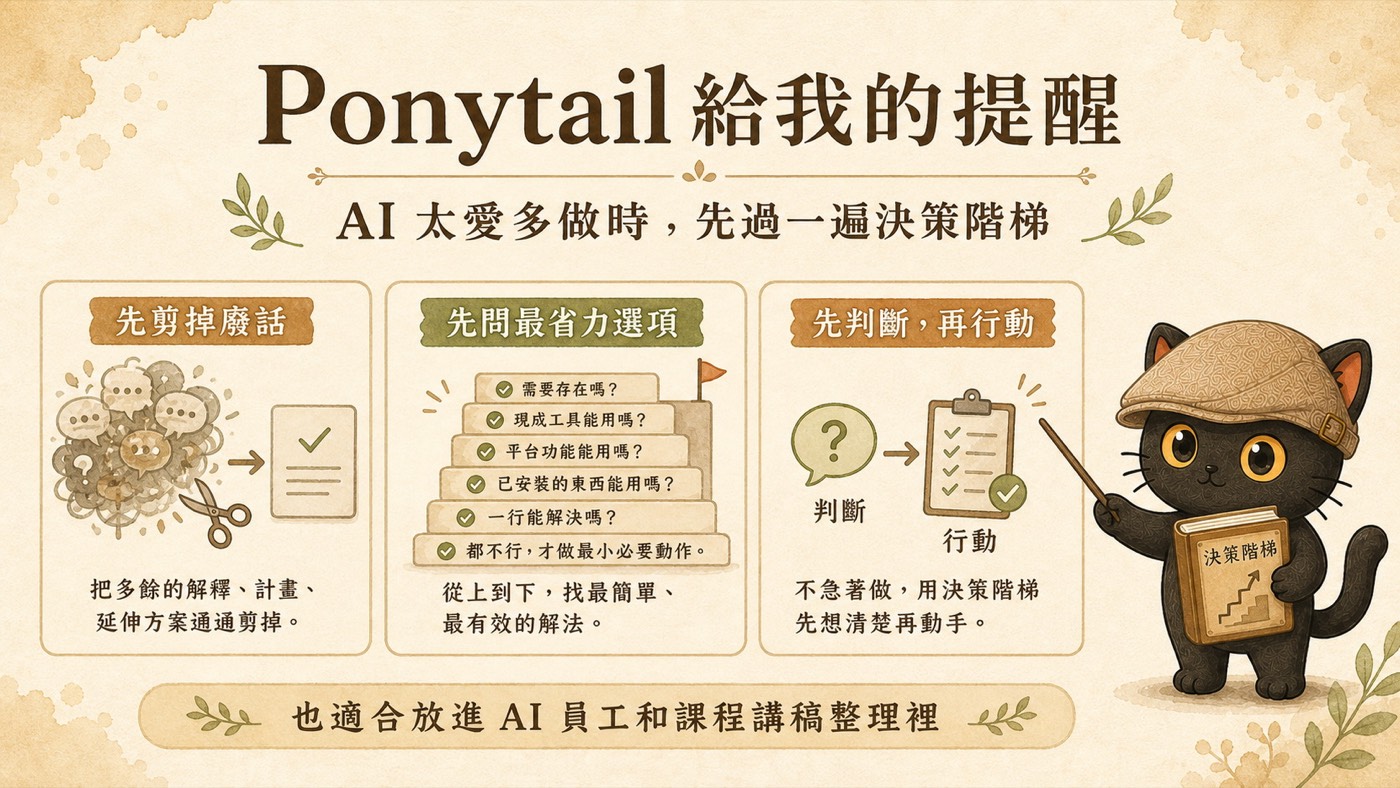
To recap: cut the excess first, ask for the least-effort option first, reason before acting.
At the Core
What Ponytail does is take the judgment a senior engineer carries implicitly ("I can see at a glance this doesn't need to be written") and turn it into a rule AI can follow reliably. That kind of judgment lives in experienced heads. It cannot be explained directly and cannot be taught easily.
That is exactly what I do every day. I do not write code, but I help people take the experience and judgment inside their heads and turn it into systems that can be accumulated, handed off, and used by AI.
Want to bring this framework into your own AI workflow?
I host two free online talks every month, sharing practical methods for using AI as a thinking partner and turning knowledge and experience into prompts, Skills, and knowledge bases. If AI knowledge management or tacit knowledge distillation interests you, the community is a good place to start.
Two free talks every month.
Join the LINE Community ↗