
What This Article Covers
People often ask me whether they should learn Obsidian to build a knowledge base. My honest answer is about something else entirely: tools will come and go, but the judgements you write down will not. This article lays out a method you can start today, the 3X4 data organisation method, three diary types multiplied by four time horizons, so that any AI you open your folder in will know exactly what you are working on.
- Obsidian is just a display layer. The documents you actually write are your knowledge base.
- Three diary types decide what you write; four time horizons decide where you store it so AI can find it.
- If you can keep a diary and organise folders, you are already building a system AI can use.
· You already use AI but feel it keeps missing your point
· You have wanted to build a knowledge base but don't know where to start
· Solopreneurs, freelancers, and founders who want AI to genuinely help
· One insight: when AI misses your point, it is usually not AI's fault
· One method: the 3X4 data organisation method, three diary types and four time horizons
· One path: no new tools, no coding, just making AI understand you
Obsidian Is Just a Tool. What You Write Is the Knowledge Base.
A lot of people come to me with the same question: should I use Obsidian for my knowledge base? Is it worth the learning curve? My knowledge base never gets off the ground, did I pick the wrong tool?
My answer is always the same: stop thinking of Obsidian as the knowledge base, because Obsidian is not the knowledge base. The documents you write with care, the indexes you build, the tags and categories you think through, those are your knowledge base. Obsidian is just the display layer, the editing interface, the search tool.
Switch to Notion, Logseq, or Apple Notes and everything you wrote is still there. The knowledge base is still there. Tools change; your recorded judgements do not. So invest your time in building the judgements themselves, not in mastering any particular tool.
AI Cannot Read Your Mind
AI has improved enormously over the past few years. I use Claude, Codex, and various agents every day. But there is one thing worth being clear about.
How Non-Engineers Build a Knowledge Base for Their Agents
My method is called the 3X4 data organisation method: three types multiplied by four time horizons.
The three types determine what you write, the three diary forms I will cover next. The four time horizons determine where you store what you write so AI can find it. Let me start with the three types. Together, these three diaries become the operating manual you hand to AI.

Work Diary: Letting AI Know What You Are Doing
A work diary records what you are working on right now, how far you have got, what problems you ran into, and how you solved them. Writing one is like writing a handover note: what I did today, how AI can pick it up, the process and steps written out.
Why is this the most important diary? Because when AI reads a work diary, it can pick up right where you left off the next morning without needing a full briefing. I spend five to ten minutes at the end of each day recording what I did and what I plan to do next. The following morning, when I open Claude or Codex, it reads yesterday's work diary and knows immediately what I am working on, ready to continue from where I stopped.

Don't Just Record What You Did
A plain activity log stops being useful once the handover is done. What I actually record is my reasoning, so that future-me and AI can reconstruct why I made that decision and how I got there. So beyond what I did, I add one more thing: why I did it this way, and what the underlying principle is. Facts fade in a few days, but the reasoning behind them is the most valuable thing to have when you look back. If time is short, at minimum write what you did and why.
For Tasks Done with AI, Split into Two Tracks
Because I do a lot of work with AI, I organise my handover notes around two separate tracks:
My judgements, the decisions I made, and why I directed things the way I did.
When AI performed well, I pin down exactly which instruction or step made it succeed, because this success might just be luck landing on the right approach. When AI fell short, I record where it got stuck, why it went wrong, and how I corrected it, so I can avoid that pitfall next time.
This makes my work diary simultaneously a handover document and an SOP archive for my collaboration with AI. Good paths accumulate over time; mistakes get avoided more reliably. My working relationship with AI gets smarter each day.
Perspective Diary: Teaching AI How You Think
A perspective diary records your views on a given matter, your decision logic, and the reasons behind your choices. My approach is simple: my own criteria, why I chose this option, why I ruled out others. You do not need to write it every day, when you face a decision or hold a clear position on something, spend a few minutes writing it down.
The value builds gradually. Once you have written enough, AI can identify patterns in your reasoning and help turn your intuitions into reusable decision frameworks. The next time a similar choice comes up, AI can look back through your perspective diary and remind you how you thought about it before.

With a process, steps, and decision criteria, AI can read this and operate the way you do. In the world of AI agents, a Skill is tacit knowledge packaged into a module AI can execute. Keep a work diary long enough and it grows into steps and workflows. Keep a perspective diary long enough and it grows into decision criteria. Put the two together and you have a Skill that belongs only to you. No programming required, no frameworks to learn, just writing your work clearly, day by day.
Mood Diary: Managing Your Focus
Many people assume the mood diary is the easy one. It is actually the most distinctive. I think emotion is a significant hidden cost for anyone running a business. If you are a solopreneur, a freelancer, or an early-stage founder, you will find your time is not as free as it looks. You finish things and keep feeling drained. You take on a project but can't get moving. You spend an afternoon on something, then feel hollow by evening. The time is spent, but the task is unfinished and you are exhausted, that is the hidden cost.
The core purpose of keeping a mood diary is to track how your attention is allocated and where it gets spent. Work you enjoy and feel no pressure doing tends to sustain your focus. Work you are doing out of obligation or that pulls against your long-term goals drains your focus faster than you expect. I make a habit each Sunday of reviewing whether I spent my energy in the right places that week, and whether I need to adjust the week ahead. This review is only for you, but over time AI can also spot patterns in it: which types of work put you in a flow state, and which situations tend to lead to procrastination.

Four Time Horizons: Deciding Where Data Lives
Once you have been writing all three diary types, there is one more thing to handle: writing things down is not enough. Where you store something determines whether AI will find it.
I organise data across four time horizons. The more frequently used something is, the closer I keep it; the less often used, the further away.
The tasks and priorities of the past few days go somewhere impossible to miss. I use a kanban board for this layer, when AI opens it, the first thing it sees is what I am working on right now. A pinned note works too. The key is that it is visible the moment anything is opened.
Visible the moment you open your knowledge base, and the first place AI looks. My habit is to drop new files directly into the root folder without filing them right away. The root folder is short-term memory, things I am using now and will refer to soon stay here.
Files you are referencing less often go into the relevant project or topic folder, keeping the root folder clean. When you need something, just point AI to the folder or search by keyword, AI is very good at bounded searches like this.
If a file has not been opened in six months, it should not be in the place you look at every day. Move it out to a separate archive. It is there when you need it; a search and a click is all it takes.
The logic of these four layers mirrors how human memory works. Short-term memory stays at hand; long-term memory goes in the drawer; things you have not touched in a long time get archived. A knowledge base designed this way lets AI search close first and move outward only when needed, which is far more efficient and keeps your root folder clean.




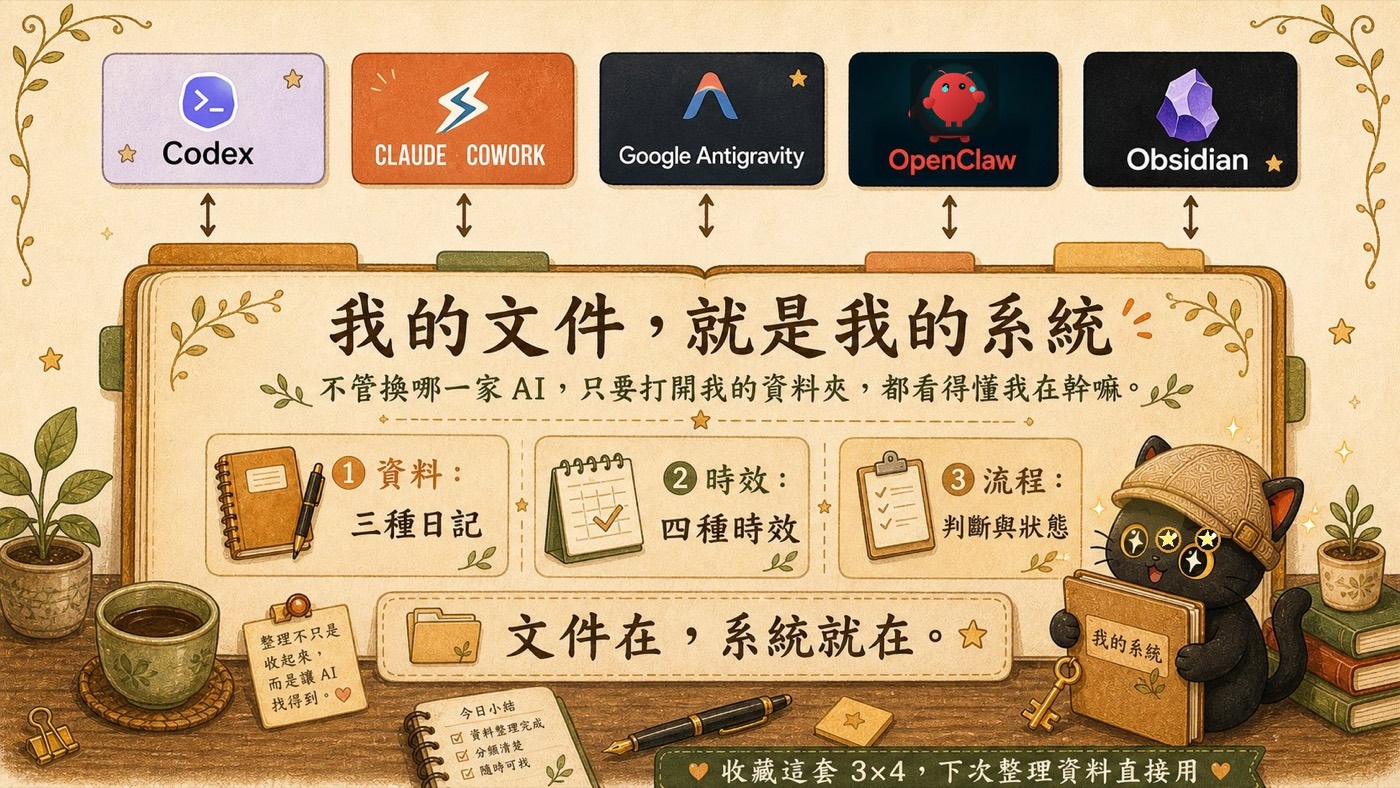
My Documents Are My System
Three diary types, four time horizons. Once you start writing this way, you notice something: no matter which AI you switch to, any one of them that opens my folder can understand what I am doing. Because my documents are my system.
I am not studying how each AI is designed. I am organising my data, judgements, and current state so that AI can learn from me. Obsidian disappears, my system remains. Claude gets replaced, my system remains. I use whichever tool is best suited to the current task and workflow.
How to Start in Practice
If you want to begin after reading this, start with the work diary. At the end of each task session, ask AI to write up a work diary entry based on what you did together. The process and progress, AI can record clearly on its own. But two things it cannot do, those you need to add yourself.
When AI finishes writing, scan it over. Check whether the process is accurate and whether any critical steps are missing. Add the moments that went especially well, and the moments that got stuck. Record the smooth ones too, just because something worked this time does not mean it will next time. Write down why it worked, and you can repeat it deliberately.
Write clearly what situation you were in, what your goal was, and why you made the decision you did given those conditions. When circumstances change later, AI can use this context to adapt rather than rigidly applying old rules. AI cannot read your mind, spell out the situation and goal, and it will be able to follow your lead.
If you can write documents, organise folders, and add tags and keywords so AI knows what each file is for, you are already building a system AI can use. This sounds technical, but it is actually part of what many people are calling prompt engineering or context management. You are already doing it.

Further Notes: Prompt Engineering and Context Management
What Is Prompt Engineering
Prompt engineering is a term OpenAI introduced in 2026. Their framing: an AI agent equals an AI model plus prompt engineering. The AI model is the brain; prompt engineering is how you control that brain. For people who don't write code, prompt engineering is far less abstract than it sounds. At its core it means three things: design your folder structure well, explain clearly what each folder is for, and give AI a path to follow through that structure.
What Is Context Management
Context is the background information you give AI. For AI to do a task well, it needs to know the before and after. Context management means making sure the right data reaches AI at the right moment, what gets pinned where it is impossible to miss, what goes into folders, what gets tagged so AI can locate it. The 3X4 data organisation method is exactly this practice.
I'm Coach Jiang
Tacit knowledge distiller and AI application planner. I share how to turn mental models into prompts so AI outputs become more precise and our own thinking sharpens, and how to organise scattered knowledge and experience into clear structures so AI can apply them flexibly across different situations.
I run two free online talks every month, sharing hands-on experience and methodology. If AI plus knowledge management, tacit knowledge distillation, or building a one-person company resonates with you, you're welcome to join my LINE community.
Join the LINE Community (free) ↗