What This Article Covers
Today's AI agents can operate your software directly. This article translates the four connection methods into plain language, illustrated with my own real-world examples using Codex. You'll learn which tasks you can delegate outright, and how to decide which method fits each situation.
· Knowledge workers who want AI to do real work for them, but freeze up the moment they see terms like API, CLI, or MCP
· People already using AI agents like Codex or Claude who want to understand how those agents actually operate software on their behalf
· Solo operators, managers, and business owners who want to know which tasks are safe to hand off to AI and how to hand them off well
· A clear picture of the four ways AI connects to software, including the trade-offs and use cases for each
· A decision sequence you can apply immediately when a new task comes up
· Concrete first steps for moving yourself from operator to delegator
First, Let's Settle One Thing: AI Already Has Hands
Most people still picture AI as something that chats and writes. But today's AI agents actually reach into software and act: pulling data from a LINE group, extracting and cleaning a meeting transcript, deploying a website, even picking up a stalled task in the middle of the night.
How it does this comes down to which connection method it uses to reach that particular piece of software. Different methods mean different capabilities, different reliability, and very different levels of oversight required from you.
You don't need to memorize the technical names. What you do need is a rough mental model of how each method works, so you can judge: can this task be delegated to AI, and if so, how?
The Four Ways AI Connects to Software
Here's each method in everyday terms, with a real example from my own work using Codex.
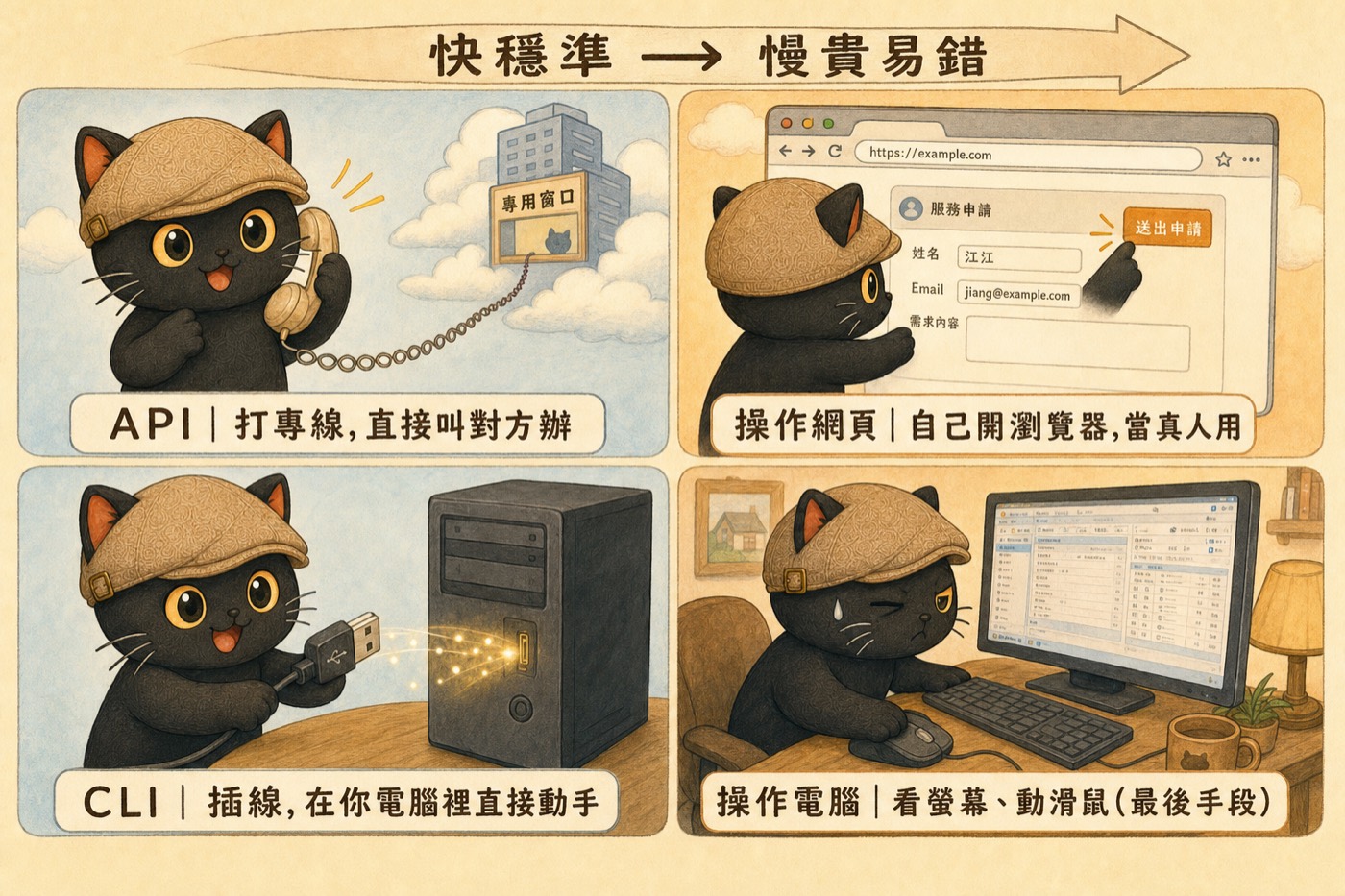
When software exposes a protocol, AI can read and write its data directly, like dialing a dedicated line straight to the other side. My Mika LINE official account works this way: every morning and evening it automatically organizes group names into a readable format and pulls back all the images, PDFs, and decks that members post, without me doing anything except participating in the conversation normally.
Running a few commands directly on your own machine, like plugging a cable into a local port. I use this to have one AI call another: after Codex finishes something, it calls Claude to review it. I also use it to dispatch multiple AI agents in parallel to research the same topic, then merge their findings. When the website needs an update, a few lines of commands push it live.
The AI opens a browser and works through it step by step, clicking buttons and filling in fields, just like a person would. This kicks in when a tool only exposes a web interface and has no protocol for direct connection. It logs in, clicks around, and gets the job done. Because it has to follow what's on screen, it's slower and more prone to getting stuck.
The AI watches the entire screen and moves the mouse, fully simulating a person sitting at a computer. I treat this as a last resort. One time I hit a usage limit in the middle of the night and a task stalled. I had Codex wake up in the early hours, watch the screen, and press the button to resume the stalled job. If any of the first three methods work, I don't use this one.
So How Do I Decide Which Method to Use?
When a task comes up, work through these questions in order:
- Does this software expose a protocol? Can AI connect directly?
- If not, can it be done via command line on the local machine?
- If not, can AI handle it through the web interface?
- If none of the above work, only then fall back to screen control.
You don't have to reason through this yourself every time. My actual approach: hand the task to the AI and add one line: "Check whether you can connect to this directly, and whether there's a more efficient method than what I have in mind. Fall back a step only if needed."
MCP Is the USB of the AI World
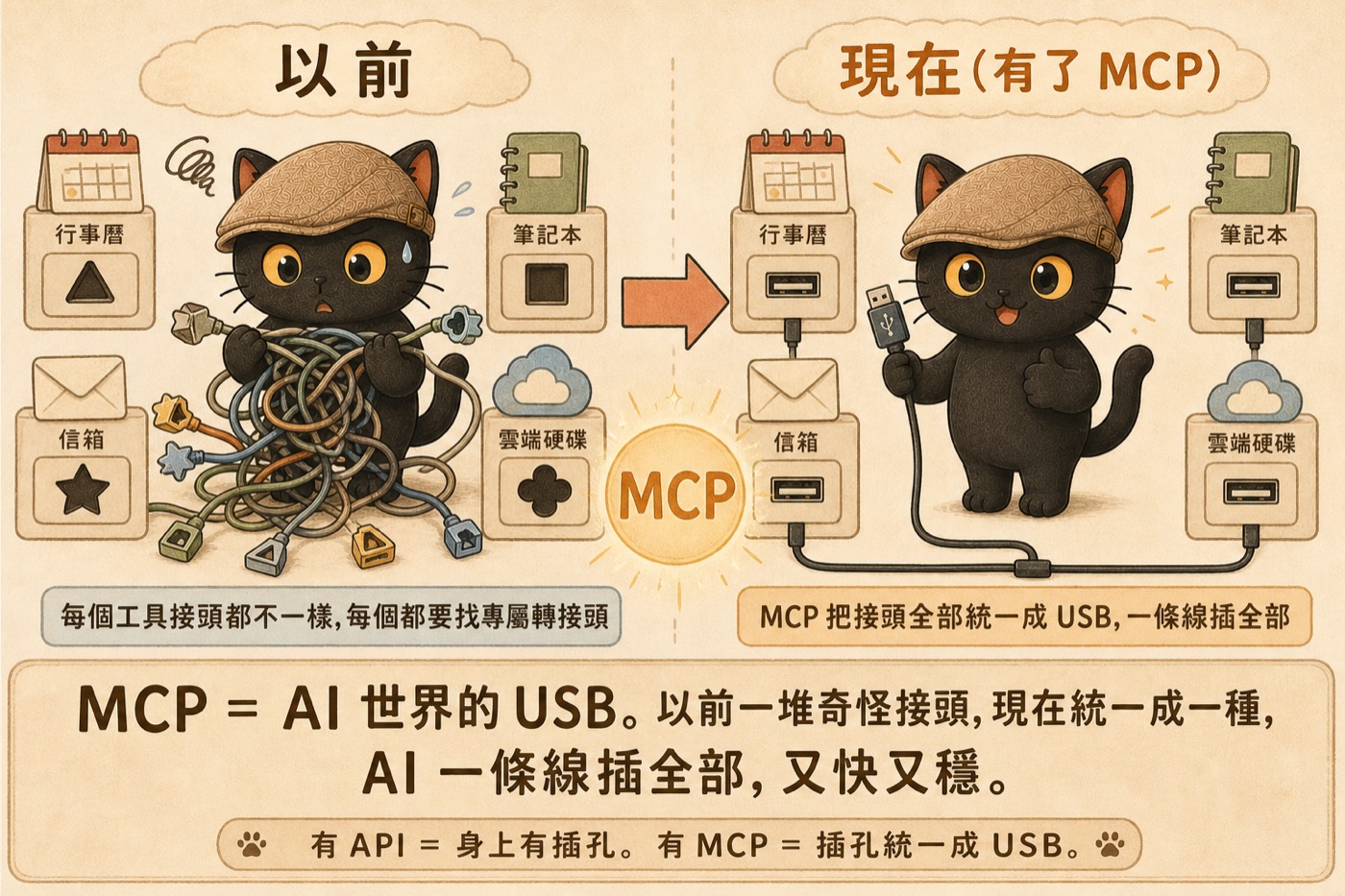
Earlier I mentioned "whether software exposes a port for AI to connect to." MCP is exactly what creates that port.
Having MCP means those sockets have been standardized into a common format that's easier to plug into.
For AI, a unified standard means lower cost and complexity when wiring up a new tool.
So MCP is USB for the AI world. Before USB, every device had its own connector: one shape for a mouse, a different shape for a printer. Swap devices and you hunted for the right cable. USB standardized everything: plug it in and it works. MCP does the same thing for AI: it brings all the tool interfaces into a single format so connecting a new tool is far less work.
More and more of the tools on my desk, including calendar, Gmail, cloud storage, and note-taking apps, are being standardized into this format. AI can connect to them with a single interface. The ones that haven't been standardized yet, or don't expose any protocol at all, force AI to fall back to opening a screen and clicking through manually. That's the whole difference, and it's what the cover image at the top of this article is showing.
How Knowledge Workers Can Apply This
Now that the mechanics are clear, here's how to bring this back to your own work. You don't need to become an engineer. You can start like this:
- Audit the repetitive manual work you do every day across different tools: copying data, reorganizing, converting files, moving things between platforms.
- For each item, ask your AI: "Can you connect directly to this software and handle this for me? Which connection method would you use?"
- Tools that already have open protocols, like calendar, Gmail, and cloud storage, are the best candidates to delegate first. They're the most stable.
- Grunt work like file conversion, transcript extraction, and data scraping can be handled locally via command line or local tooling, no supervision needed.
- Tasks that genuinely require screen interaction get treated as a last resort, and you review the output yourself afterward.
A few before-and-after examples from my own workflow:
Important messages and files used to be scattered across the group, hard to find. Now AI automatically organizes everything twice a day and archives all shared files.
I used to transcribe word by word. Now I give AI a screenshot and it extracts the transcript, labels each speaker, and cleans up misheard words on its own.
Making a change used to require memorizing a long sequence of steps. Now a few commands push the update live, and AI verifies the deployment succeeded on its own.
What You're Actually Training Is Not Button-Clicking
Before I close, I want to bring the whole article back to what I actually think.
- Don't rush to memorize the terminology. Protocol, CLI, MCP: these labels will keep changing. Chasing them is a losing game.
- Focus first on knowing roughly which connection method is most efficient for a given task. That judgment doesn't go out of date.
- What you're really building is the skill of delegation and the skill of workflow design.
- In the AI era, what matters is whether you know which path to send a task down first, not whether you personally know how to click the button.
Stop memorizing terms. Start shifting your position.
If you've read this far and realize you still default to thinking "how do I operate this" rather than "which path should I send AI down," that's completely normal. Most people start there. I run free online talks every month on exactly this: how to move yourself from the operator's seat to the delegator's and designer's seat.
Two free sessions every month.
Join the LINE Community ↗