What this piece is about
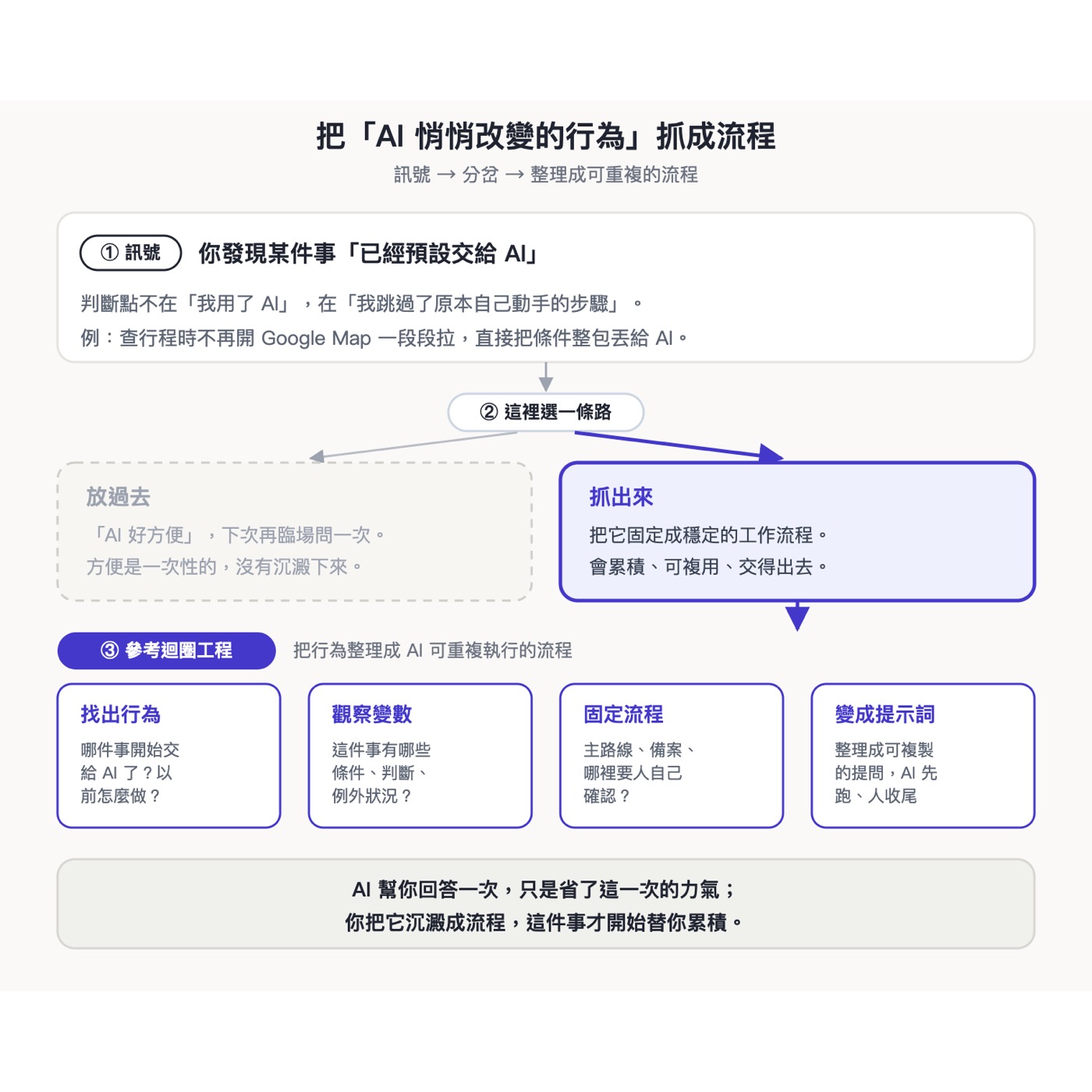
While checking my itinerary on a business trip, I noticed my first move had shifted from "opening Google Maps" to "asking AI," and I hadn't noticed at all. Starting from that case, this piece is about something I think everyone should do: find these behaviors AI has quietly changed, capture them as a concrete, well-defined workflow, and eventually even let AI run them for you. A copy-paste prompt is included at the end.
· People who use AI every day yet can't say exactly which work habits AI has changed
· People who often ask AI the same kind of question and have to describe it from scratch each time
· People who want AI to move from "answering questions" to "taking over the process"
· A way to spot the signal: how to notice something has quietly been handed to AI
· A four-step method following Loop Engineering: find the behavior, observe the variables, fix the process, make it a prompt
· A copy-paste prompt you can use directly
A business-trip case
Yesterday, on a business trip, I noticed one of my habits had been swapped out by AI.
When checking the itinerary, I didn't open Google Maps and drag out the route segment by segment. I handed the situation straight to AI: how the normal schedule goes, what to do if it ends an hour early, what to do if it ends an hour late, and asked it to find the routes and train times in advance. Google Maps was left with only one job: confirming the departures on site.
That's when I realized my first move for planning a trip had already shifted from opening the map to asking AI.
This is a signal
What makes this worth noticing is the skipping: I skipped a step I used to do by hand, and skipped it without realizing. Plenty of people use AI; the signal is that I quietly stopped doing that step myself.
Everyone has these moments. It could be looking things up, planning a schedule, writing an email, or putting together a report. One day you look back and realize you've already defaulted to asking AI first for that task.
Here's a fork
You think "AI is so convenient," and next time the same thing comes up, you ask again on the spot. The convenience is one-off, and nothing is left behind.
You organize the task into a concrete, well-defined workflow. An organized workflow accumulates, can be reused, and can be handed off, and eventually AI can even run it automatically.
The difference between the two paths is the difference between "AI answers you once" and "AI starts accumulating for you."
Following Loop Engineering, organize the behavior into a workflow AI can run repeatedly
Following the Loop Engineering approach, I organize a behavior AI has changed into a workflow, in four steps.
A ready-to-use prompt
If you want to try it right away, copy the block below to AI and replace the blanks with your own task.
Turn a task into a system you can run again and again
Hand the building part to an agent workflow, and the auto-run part to program automation. The real point is whether you've kept a task as a process you can run again next time.
This is also what I keep doing: helping individuals and teams organize their work into processes AI can catch and run repeatedly.
Two free talks every month.
Join the LINE Community ↗